Using a UPS for Graceful Shutdowns
A recent power outage caused bit flips in a Proxmox SSD, prompting the installation of an uninterruptible power supply (UPS) and supporting automations for graceful shutdowns during outages. A Debian VM acts as a Network UPS Tools (NUT) server, monitoring the UPS battery status. When the UPS switches to battery mode, Proxmox initiates its shutdown sequence, followed by TrueNAS. This hopefully mitigates future data corruption during unexpected outage events.
Henry Chen
26 February 2026
Overview
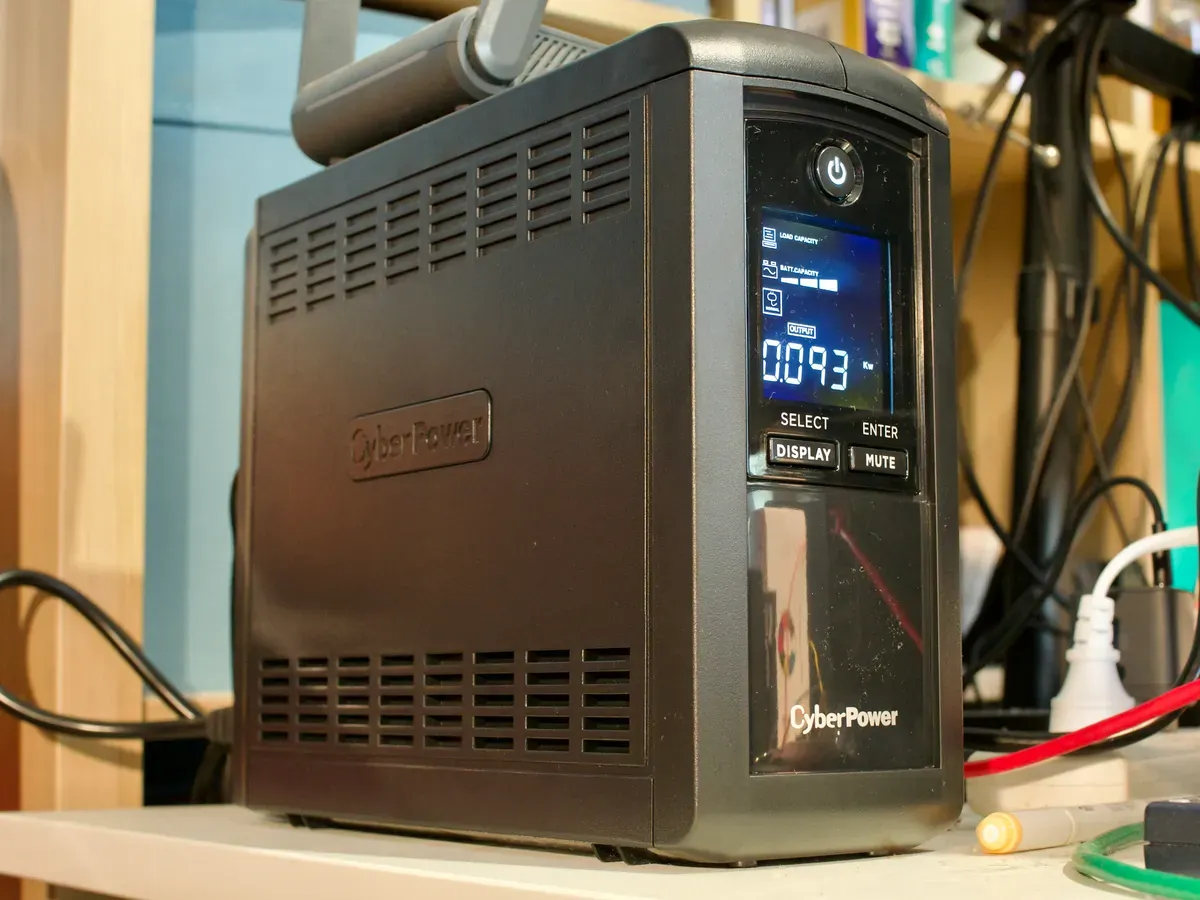
A recent thunderstorm event resulted in a power outage, leading to the bit flips within the Proxmox SSD, similar to an incident documented here. The likely cause of this was either a surge in the power line that propagated through the system and affected the SSD or a processes that didnt finish writing to disk at the time of power loss. To mitigate the the likelyhood of this happening again, a UPS (Uninterruptible Power Supply) was installed and automations to enable a graceful automated shutdowns for TrueNAS and Proxmox were created.
Architecture
The setup consists of a master-slave topology using Network UPS Tools (NUT). The following components are involved:
grace: A bare-metal Debian VM hosted on Proxmox, acting as the NUT server (netserver) with direct USB access to the UPS.- Proxmox and TrueNAS: Function as NUT clients (
netclient/slave), pollinggracefor updates on the UPS status.
When the UPS switches to battery power , it is detected by grace. Proxmox polls for the battery power state and, if detected, it initiates its shutdown procedures first. Subsequently, TrueNAS shuts down, ensuring that virtual machines are powered off before storage systems go offline.
Setting up the UPS Monitoring Server
The NUT server (grace) is deployed as a bare-metal VM on Proxmox to avoid potential USB passthrough permission issues often encountered with LXC containers. Debian 13 (server install) is selected for its lightweight size (700MB) and simplicity. Before starting the VM, enable USB device passthrough in Proxmox's Hardware settings by selecting "Add USB Device" and choosing "Use Device ID." Boot and install the OS from an ISO image as usual.
To confirm that the UPS is detected after installing Debian 13, execute:
lsusb
# ...
# Bus 003 Device 045: ID 0764:05XX Cyber Power System, Inc. CP1500 AVR UPS
Install NUT on grace:
sudo apt update && sudo apt upgrade -y
sudo apt install -y nut
Local Configuration for Testing
Before configuring NUT for the entire network, ensure it functions correctly locally on grace. Modify /etc/nut/ups.conf to use the generic UPS HID Drivers built into the NUT package:
[myups]
    driver = usbhid-ups
    port = auto
Set the mode to standalone in /etc/nut/nut.conf:
- MODE=none
+ MODE=standalone
Configure /etc/nut/upsmon.conf to monitor locally:
MONITOR myups@localhost 1 upsmon upsmonpwd master
MINSUPPLIES 1
SHUTDOWNCMD "/sbin/shutdown -h +0"
Add a local user in /etc/nut/upsd.users. Note that upsmon is the user and password is upsmonpwd:
[upsmon]
  password = upsmonpwd
  upsmon master
Start and test NUT:
sudo systemctl restart nut-server nut-monitor
upsc myups@localhost
The output should display UPS status information, such as battery charge, load, and status flags. Once confirmed, proceed to network configuration.
Configuring the NUT Master
Once the local testing is successful, switch the mode in /etc/nut/nut.conf to netserver:
MODE=netserver
Optionally, configure the retry amount if you do not want NUT to keep polling for the USB driver by editing /etc/nut/ups.conf:
maxretry = 3
[myups]
    driver = usbhid-ups
    port = auto
Update the following files:
/etc/nut/upsd.conf:
LISTEN 0.0.0.0 3493
/etc/nut/upsd.users:
[upsmon]
  password = upsmonpwd
  upsmon master
/etc/nut/upsmon.conf:
MONITOR myups@localhost 1 upsmon upsmonpwd master
MINSUPPLIES 1
SHUTDOWNCMD "/sbin/shutdown -h +0"
NOTIFYCMD /usr/sbin/upssched
NOTIFYFLAG ONBATT SYSLOG+EXEC
NOTIFYFLAG ONLINE SYSLOG+EXEC
POLLFREQ 5
POLLFREQALERT 5
HOSTSYNC 15
DEADTIME 15
POWERDOWNFLAG /etc/killpower
OFFDURATION 30
RBWARNTIME 43200
NOCOMMWARNTIME 300
FINALDELAY 5
/etc/nut/upssched.conf:
CMDSCRIPT /usr/bin/upssched-cmd
PIPEFN /run/nut/upssched.pipe
LOCKFN /run/nut/upssched.lock
AT ONBATT * START-TIMER onbatt_shutdown 120
AT ONLINE * CANCEL-TIMER onbatt_shutdown
/usr/bin/upssched-cmd:
#!/bin/sh
case "$1" in
    onbatt_shutdown)
        logger "UPS on battery too long - initiating shutdown"
        /usr/sbin/upsmon -c fsd
        ;;
esac
exit 0
Restart the services:
sudo systemctl restart nut-server nut-monitor
Configuring TrueNAS
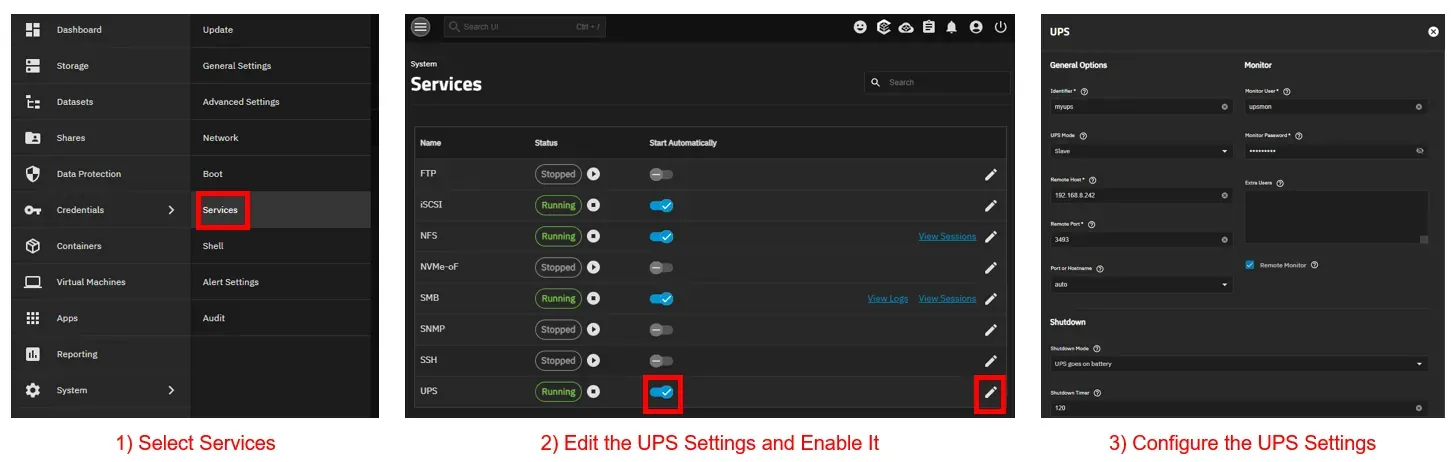
TrueNAS SCALE features a built-in UPS service that interacts with NUT. Navigate to System > Services > UPS > Edit in the web interface and configure it as follows:
- UPS Mode: Slave
- Remote Host:
192.168.8.242(grace's IP) - Remote Port:
3493 - Username / Password:
upsmon/upsmonpwd - Shutdown Mode: UPS goes on battery
- Shutdown Timer:
120seconds (allowing Proxmox to shut down first)
Proxmox Configuration
Proxmox lacks native UPS shutdown functionality, so NUT is configured manually. Install NUT:
apt install nut -y
Configure /etc/nut/nut.conf:
MODE=netclient
Configure /etc/nut/upsmon.conf:
MONITOR [email protected]:3493 1 upsmon upsmonpwd slave
POWERDOWNFLAG /etc/killpower
SHUTDOWNCMD "/sbin/shutdown -h now"
FINALDELAY 10
NOTIFYCMD /sbin/upssched
NOTIFYFLAG ONBATT SYSLOG+EXEC
NOTIFYFLAG ONLINE SYSLOG+5xec
Configure /etc/nut/upssched.conf:
CMDSCRIPT /usr/bin/upssched-cmd
PIPEFN /run/nut/upssched.pipe
LOCKFN /run/nut/upssched.lock
AT ONBATT * START-TIMER onbatt_shutdown 60
AT ONLINE * CANCEL-TIMER onbatt_shutdown
Configure /usr/bin/upssched-cmd:
#!/bin/sh
case "$1" in
    onbatt_shutdown)
        logger "UPS on battery too long - forcing shutdown"
        /usr/sbin/upsmon -c fsd
        ;;
esac
exit 0
The
upsmon -c fsd(forced shutdown) is intentional - NUT's shutdown sequencing requires it sinceSHUTDOWNCMDalone won't trigger the full UPS shutdown handshake when called outside ofupssched's own flow.
Restart and verify:
systemctl restart nut-monitor
upsc [email protected]